 f14cce55ff
The FPGA gateware region is blocked from trivial readout via USB:
this makes it a tiny bit harder to obtain the gateware image, which
contains the secret keys. This slightly aids users who haven't
burned any efuse keys and are using the default "null" key from
a trivial readout attack, and it also hampers a WBSTAR exploit.

This makes the most convenient path of attack to be loading
a custom xous.img (or otherwise exploiting the kernel) with
a gadget that is capable of reading the gateware region
through priveleged code, and then relaying it over USB through
some run-around of the firewall. This primitive isn't impossible
to create but it doesn't exist and has no use in a normal
operational flow, so, it's going to at least force an attacker
to write some code, as opposed to using off the shelf utilities
we provide.
4.9 KiB
Tools
usb_update.py
usb_update.py is the script for copying firmware packages from a host onto a Precursor device.
Installation: Linux (Ubuntu/Debian)
sudo pip3 install pyusb progressbar2(you needpyusbandprogressbar2in the sudo environment)- you probably need to run as
sudo:sudo ./usb_update.py [args]to access the USB port; add the appropriate command line arguments
In order to get xtask to work (it calls usb_update.py) you will need to add a udev rule to eliminate the need for sudo privs. Under Ubuntu 18.04LTS, it looks something like this:
- Add a file called
99-precursor-usb.rulesto /etc/udev/rules.d/ with the following content as a single line terminated by a carriage return:SUBSYSTEM=="usb", ATTRS{idVendor}=="1209", ATTRS{idProduct}=="5bf0", GROUP="plugdev", TAG+="uaccess" - Run
sudo udevadm control --reload-rules - If the device was plugged in, you'll have to unplug it and plug it back in again for the new rules to take effect.
We would appreciate any improvements/suggestions for alternate Linux distros. udev rules seem very distro-specific and change with time.
Installation: Windows 10
- You will need to install python3 from the Windows App store if you don't already have it
- Run
pip3 install pyusb progressbar2from a Powershell - use zadig to remap
Precursor pvt2's Windows driver tolibusb-win32 - Run
python3 .\usb_update.py [args]from a Powershell; elevated privs are not necessary after usingzadig.
Users have reported trouble navigating the Zadig UI. Here is a guide:
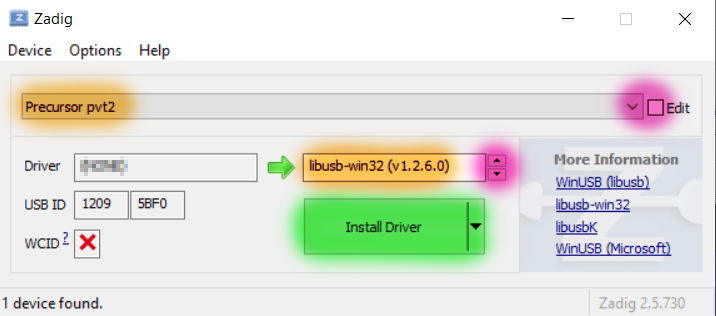
- Select "Precursor pvt2" from the large pull-down box. Click the "Edit" checkbox if the menu is blank or unselectable.
- Select the driver to be "libusb-win32", using the red highlighted arrows, as shown in the right text box. You can ignore the text in the left box.
- Click the "Install Driver" (or "Reinstall driver") button (highlighted in green) once these settings are made. This step can take several minutes.
Installation: iOS
We have no experience with iOS, nor do we own any modern Apple machines. In short, we have no idea how to iOS.
I hear it's popular with the cool kids in Silicon Valley. If someone can contribute a guide that'd be great.
Performance Note
Systems using an AMD Ryzen chipset run about 5x slower than others (e.g. Raspberry Pi, Intel chipsets). This holds true across Linux/Windows OS. The effect has been confirmed on both B450 and B550 Socket AM4 motherboards. It seems to be linked with full-speed packet rates being throttled on AMD motherboards by the chipset, but TBD. Write speed is ~8.5kiB/s on AMD, vs ~44kiB/s on Raspberry Pi.
Usage
usb_update.py works with Precursor devices that have Xous 0.8 or 0.9. Later releases may work,
but check the release notes.
The updater encodes the offsets of every binary location in the script. When these locations shift, then the updater script should no longer be used for a given Precursor revision.
usage: usb_update.py [-h] [-s [SoC gateware file]] [-l [loader file]] [-k [kernel file]] [-e [EC gateware package]] [-w [WF200 firmware package]] [--audiotest [Test audio clip]] [--peek ADDR] [--poke ADDR DATA] [--check-poke]
                     [--config] [-i IMAGEFILE ADDR] [-n] [-f] [--bounce]

Update/upload to a Precursor device running Xous 0.8/0.9

optional arguments:
  -h, --help            show this help message and exit
  -s [SoC gateware file], --soc [SoC gateware file]
                        SoC gateware
  -l [loader file], --loader [loader file]
                        Loader
  -k [kernel file], --kernel [kernel file]
                        Kernel
  -e [EC gateware package], --ec [EC gateware package]
                        EC gateware
  -w [WF200 firmware package], --wf200 [WF200 firmware package]
                        WF200 firmware
  --audiotest [Test audio clip]
                        Test audio clip (must be 8kHz WAV)
  --peek ADDR           Inspect an address
  --poke ADDR DATA      Write to an address
  --check-poke          Read data before and after the poke
  --config              Print the descriptor
  -i IMAGEFILE ADDR, --image IMAGEFILE ADDR
                        Manually specify an image and address. Offset is relative to bottom of flash.
  -n, --no-verify       Skip readback verification (may be necessary for large files to avoid WDT timeout). Only honored with -i.
  -f, --force           Ignore gitrev version on SoC and try to burn an image anyways
  --bounce              cycle the device through a reset
You can try reading the csr.csv descriptor out of the ROM to see if usb_update.py is working correctly.
Part of it is located at 0x20277008, and it's always 0x2d2d2d2d (this is part of a ---- ASCII text header),
as follows:
% python3 ./usb_update.py --peek 0x20277008
0x2d2d2d2d
NB: Trivial readout via USB of the gateware is blocked by the USB core now, for security reasons.