 a0f3e30de6
* initial setup and rename "how to" to "setup"

* move API to main nav

* move api to main nav

* add get starated, rework nav order

* rename to install move mds out of install section

* update api nav and home page

* add install docs and python qs updates

* python get started work

* remove c and obj c for now

* move java, python, and obj-c docs under api folder

* move java api html to iframe (ugh)

* remove api docs w/o details, move api text getstar

* remove api docs wo detail updates get started

* remvoe iframes

* move eco system to main nav

* fix api buttons

* added more examples moved intro to ORT

* fix links

* fix get started titles

* fix get started titles

* fix more links

* fix more links

* more link fixes

* fix nav remove inferencing and training subnav

* fix top nav remove inference and training nav

* fix title

* fix tutorials nav hierarchy

* fix python api button

* add tenorflow keras example

* fix quickstart toc

* add imports fix spacing

* fix links

* update nav and python get started page

* move ort training example, add coming soon for iot

* update C# get started

* fix spacing on quantization

* Add some js get started content

* fix formatting

* fix typo

* removed onnx-pytorch and onnx-tf

* updated pip install torch and added links iot page

* added pytorch tutorial heirarchy

* updated web to docs soon added release blog link

* add web link
5.4 KiB
| title | has_children | nav_order |
|---|---|---|
| Execution Providers | true | 10 |
ONNX Runtime Execution Providers
{: .no_toc }
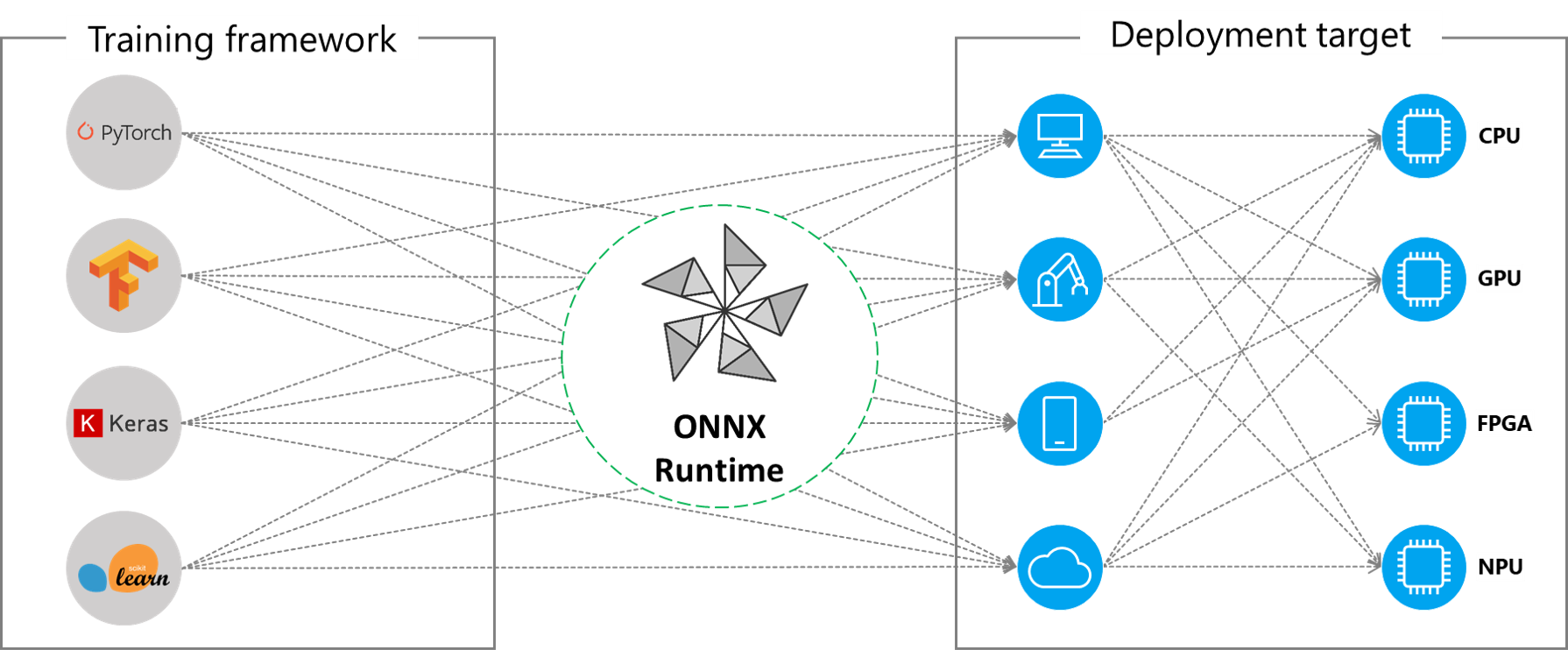
ONNX Runtime works with different hardware acceleration libraries through its extensible Execution Providers (EP) framework to optimally execute the ONNX models on the hardware platform. This interface enables flexibility for the AP application developer to deploy their ONNX models in different environments in the cloud and the edge and optimize the execution by taking advantage of the compute capabilities of the platform.
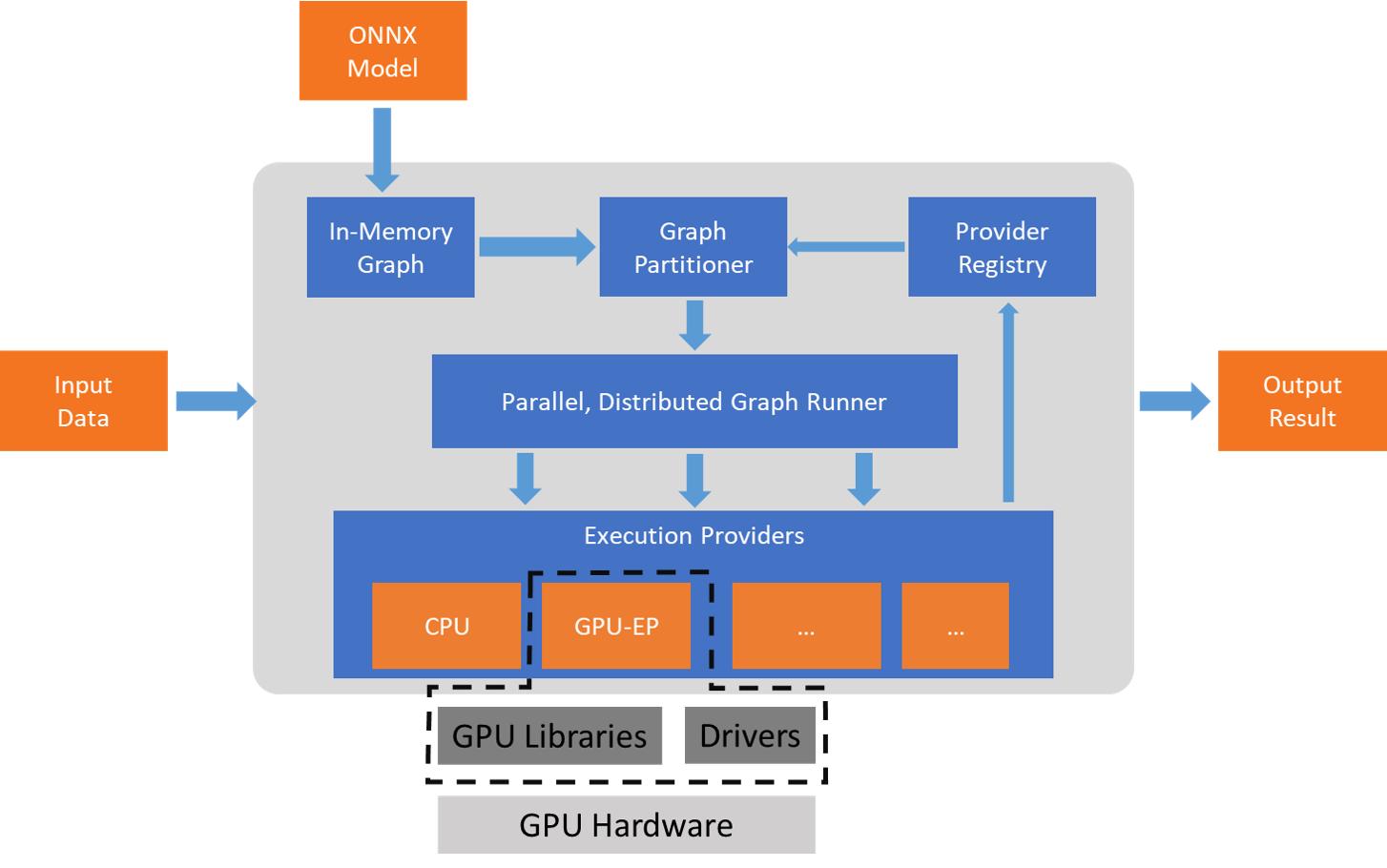
ONNX Runtime works with the execution provider(s) using the GetCapability() interface to allocate specific nodes or sub-graphs for execution by the EP library in supported hardware. The EP libraries that are pre-installed in the execution environment process and execute the ONNX sub-graph on the hardware. This architecture abstracts out the details of the hardware specific libraries that are essential to optimize the execution of deep neural networks across hardware platforms like CPU, GPU, FPGA or specialized NPUs.
ONNX Runtime supports many different execution providers today. Some of the EPs are in production for live service, while others are released in preview to enable developers to develop and customize their application using the different options.
Contents
{: .no_toc }
- TOC placeholder {:toc}
Summary of supported Execution Providers
| CPU | GPU | IoT/Edge/Mobile | Other |
|---|---|---|---|
| Default CPU | NVIDIA CUDA | Intel OpenVINO | NUPHAR (tvm/llvm) (preview) |
| Intel DNNL | NVIDIA TensorRT | ARM Compute Library (preview) | Rockchip NPU (preview) |
| DirectML | Android Neural Networks API | Xilinx Vitis-AI (preview) | |
| AMD MIGraphX (preview) | ARM-NN (preview) | ||
| CoreML (preview) |
Add an Execution Provider
Developers of specialized HW acceleration solutions can integrate with ONNX Runtime to execute ONNX models on their stack. To create an EP to interface with ONNX Runtime you must first identify a unique name for the EP. Follow the steps outlined here to integrate your code in the repo.
Build ONNX Runtime package with EPs
The ONNX Runtime package can be built with any combination of the EPs along with the default CPU execution provider. Note that if multiple EPs are combined into the same ONNX Runtime package then all the dependent libraries must be present in the execution environment. The steps for producing the ONNX Runtime package with different EPs is documented here.
APIs for Execution Provider
The same ONNX Runtime API is used across all EPs. This provides the consistent interface for applications to run with different HW acceleration platforms. The APIs to set EP options are available across Python, C/C++/C#, Java and node.js.
Note we are updating our API support to get parity across all language binding and will update specifics here.
`get_providers`: Return list of registered execution providers.
`get_provider_options`: Return the registered execution providers' configurations.
`set_providers`: Register the given list of execution providers. The underlying session is re-created.
    The list of providers is ordered by Priority. For example ['CUDAExecutionProvider', 'CPUExecutionProvider']
    means execute a node using CUDAExecutionProvider if capable, otherwise execute using CPUExecutionProvider.
Use Execution Providers
import onnxruntime as rt

#define the priority order for the execution providers
# prefer CUDA Execution Provider over CPU Execution Provider
EP_list = ['CUDAExecutionProvider', 'CPUExecutionProvider']

# initialize the model.onnx
sess = rt.InferenceSession("model.onnx", providers=EP_list)

# get the outputs metadata as a list of :class:`onnxruntime.NodeArg`
output_name = sess.get_outputs()[0].name

# get the inputs metadata as a list of :class:`onnxruntime.NodeArg`
input_name = sess.get_inputs()[0].name

# inference run using image_data as the input to the model
detections = sess.run([output_name], {input_name: image_data})[0]

print("Output shape:", detections.shape)

# Process the image to mark the inference points
image = post.image_postprocess(original_image, input_size, detections)
image = Image.fromarray(image)
image.save("kite-with-objects.jpg")

# Update EP priority to only CPUExecutionProvider
sess.set_providers('CPUExecutionProvider')

cpu_detection = sess.run(...)