 0844b3e961 probably should have split this into two commits. oh well. first part introduces a check to see if root keys are initialized, and if so, tries to mount the PDDB. If it can't mount, it asks the user if they want to format it. It also updates the progress of the fromatting. the second part redoes the salt once again. After some discussion SHA512/256 is also resistant to length extension attacsk so we don't need to use the HMAC technique suggested. Would prefer to reduce the number of algos to analyze, so we're going to a simple SHA512/256 hash of the salt/basis name/plaintext password to generate the salt that goes into the bcrypt routine that ultimately generates the final key used by the system. |
||
|---|---|---|
| .. | ||
| src | ||
| Cargo.toml | ||
| README.md | ||
| shellchat_screen1.png | ||

Shell Chat
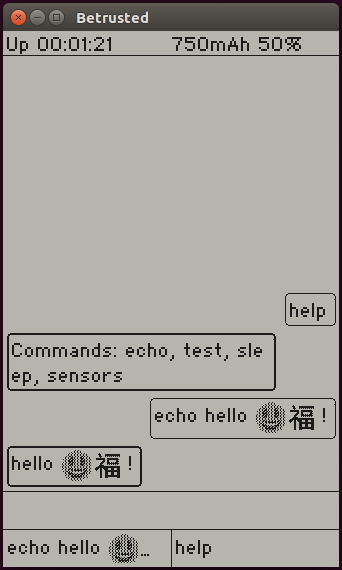
shellchat is a baseline demo application for Xous. It uses a chat-client
style interface (stacking bubbles of text, with user input right-aligned
and shell feedback left-aligned) to facilitate interactions with the hardware.
It implements the basic envisioned structure of a Xous application, namely:
- Text input comes via the
ime-frontend - Graphical output is rendered via the
gam
Other facilities for handling system-level messages, such as menu configurations and network events, have yet to be implemented. However, they will likely end up with a demo in this application first.
To make your own command, copy the ver.rs template (for an example with argument parsing),
or snag the very simple echo template below, and put
it in the services/shellchat/src/cmds/ directory:
use crate::{ShellCmdApi, CommonEnv};
use xous_ipc::String;

#[derive(Debug)]
pub struct Echo {
}

impl<'a> ShellCmdApi<'a> for Echo {
    cmd_api!(echo); // inserts boilerplate for command API

    fn process(&mut self, args: String::<1024>, _env: &mut CommonEnv) -> Result<Option<String::<1024>>, xous::Error> {
        Ok(Some(rest))
    }
}
The "verb" is the name of your command, and it is the argument to the cmd_api!() macro.
process() is your "main" function, and args is a string which contains the
rest of the line that was typed into the chat, minus the verb used to identify
your command (the arguments, as they may be, but not tokenized or parsed in
any way). env contains some items in a common environment, for example, connections
to the GAM, LLIO server or other resources required by your implementation.
Once you've added your command to the directory, go to the cmds.rs file, and follow
the four-step instructions embedded within the file, starting around line 40.
Things to Keep in Mind
- Xous is currently
nostd - When you're done adding your command, you should be able to do a
cargo xtask runand it will fire up an emulated environment, like the one above - Type...very...slowly...when using the emulated environment.