| .. | ||
| locales | ||
| src | ||
| Cargo.toml | ||
| README.md | ||
| repl_screenshot.png | ||


REPL
A simple demo application that provides a bare-bones REPL framework.
Copying This Demo to a New App
- Add a UX context by editing
services/gam/src/lib.rs/EXPECTED_BOOT_CONTEXTS - Copy this demo application, and rename the relevant structures in its
Cargo.tomlandmain.rs. - Add it to the Workspace
default-membersandmembersarrays by editing./Cargo.toml - Add it to the build by editing
xtask/src/main.rsand inserting it into the relevant descriptor. Typically, you would insert your app into thehw_pkgsarray, as this is what is built and targeted for full hardware builds. Most of the other trimmed-down descriptors are for debug, emulation, and benchmarking. - (optional) You may also need to run
cargo xtask generate-localesif you modify/add any internationalization strings. - Add entries to the app switching menu.
services/status/src/appmenu.rsto add the menu item (pluslocales/i18n.jsonin the status directory if you want translated names for the app), andservices/status/src/main.rsto add the Opcode (inside theStatusOpcodestruct, around line 55) and the actual operation itself (in the mainloop, around line 670).
Details
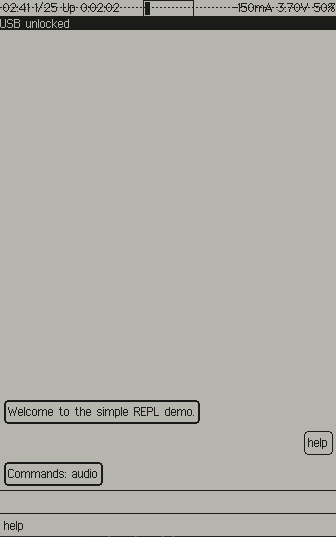
repl is a baseline demo application for Xous. It uses a chat-client
style interface (stacking bubbles of text, with user input right-aligned
and shell feedback left-aligned) to facilitate interactions.
It implements the basic envisioned structure of a Xous application, namely:
- Text input comes via the
ime-frontend - Graphical output is rendered via the
gam
To make your own command, copy the audio.rs template
in the apps/repl/src/cmds/ directory, or use this very basic echo
template:
use crate::{ShellCmdApi, CommonEnv};
use xous_ipc::String;

#[derive(Debug)]
pub struct Echo {
}

impl<'a> ShellCmdApi<'a> for Echo {
    cmd_api!(echo); // inserts boilerplate for command API

    fn process(&mut self, args: String::<1024>, _env: &mut CommonEnv) -> Result<Option<String::<1024>>, xous::Error> {
        Ok(Some(rest))
    }
}
The "verb" is the name of your command, and it is the argument to the cmd_api!() macro.
process() is your "main" function, and args is a string which contains the
rest of the line that was typed into the chat, minus the verb used to identify
your command (e.g. the arguments, but not tokenized or parsed in
any way). env contains some items in a common environment, for example, connections
to the GAM, LLIO server or other resources required by your implementation.
Once you've added your command to the directory, go to the cmds.rs file, and follow
the four-step instructions embedded within the file, starting around line 40.