 061284ec5f Here's an arcane bug for you: When powering down, the Spartan 7 3.3V I/O drivers will output a roughly 800us wide glitch as 3.3V falls below around 1.7V, if the 0.95V core voltage comes down first (which it does because we have an active discharge on 0.95V, but not on 3.3V). In this case, it's just wide and high enough to cause the BOOST mode line to engage, which takes the BOOST output and ties it to VBUS, which is just enough for the system to think you're powering it back on again. Which is not what you want when powering down. The ultimate fix was to put a heftier pull-down on the BOOST line so that it can't trip the BOOST output into the VBUS. Another option could be more active discharge FETs, but that would require a full board spin and we are already at certification, so we'll stick with the stronger pull-down on BOOST. It seems to be a robust fix in the worst corner cases we can find. The downside is that when powering an external USB device, you are burning an extra 30mW of power overcoming the pull-down, but typically, any external USB devices plugged into Precursor will burn far in excess of that, so the delta should be negligible. |
||
|---|---|---|
| .. | ||
| src | ||
| Cargo.toml | ||
| README.md | ||
| shellchat_screen1.png | ||

Shell Chat
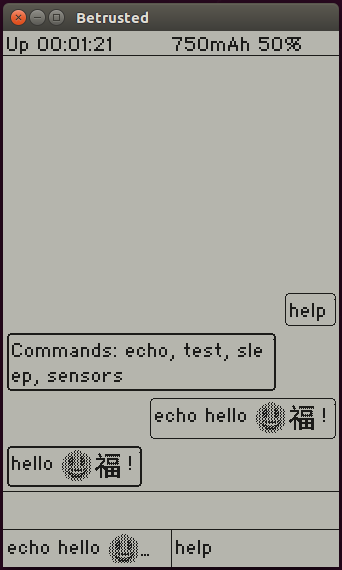
shellchat is a baseline demo application for Xous. It uses a chat-client
style interface (stacking bubbles of text, with user input right-aligned
and shell feedback left-aligned) to facilitate interactions with the hardware.
It implements the basic envisioned structure of a Xous application, namely:
- Text input comes via the
ime-frontend - Graphical output is rendered via the
gam
Other facilities for handling system-level messages, such as menu configurations and network events, have yet to be implemented. However, they will likely end up with a demo in this application first.
To make your own command, copy the echo.rs template or snag the one below, and put
it in the services/shellchat/src/cmds/ directory:
use crate::{ShellCmdApi, CommonEnv};
use xous_ipc::String;

#[derive(Debug)]
pub struct Echo {
}

impl<'a> ShellCmdApi<'a> for Echo {
    cmd_api!(echo); // inserts boilerplate for command API

    fn process(&mut self, args: String::<1024>, _env: &mut CommonEnv) -> Result<Option<String::<1024>>, xous::Error> {
        Ok(Some(rest))
    }
}
The "verb" is the name of your command, and it is the argument to the cmd_api!() macro.
process() is your "main" function, and args is a string which contains the
rest of the line that was typed into the chat, minus the verb used to identify
your command (the arguments, as they may be, but not tokenized or parsed in
any way). env contains some items in a common environment, for example, connections
to the GAM, LLIO server or other resources required by your implementation.
Once you've added your command to the directory, go to the cmds.rs file, and follow
the four-step instructions embedded within the file, starting around line 40.
Things to Keep in Mind
- Xous is currently
nostd - When you're done adding your command, you should be able to do a
cargo xtask runand it will fire up an emulated environment, like the one above - Type...very...slowly...when using the emulated environment.