 765519ff32 - moved most ping state into the Net crate proper, since the smoltcp implementation assumes a tightly bound set of objects and lifetimes in its icmp abstraction - created various convenience abstractions for handling single and multiple pings, blocking and non-blocking. - refactored the "net" command to use the new form Initial testing indicates there are still some bugs (seems to be with the way we are handling timestamping and doing pong retirement) but at least we're not getting tons of async callback errors like we were before, and we're not shuttling obscene amounts of state using Arc-Mutex between the input and output of the ping operations. |
||
|---|---|---|
| .. | ||
| src | ||
| Cargo.toml | ||
| README.md | ||
| shellchat_screen1.png | ||

Shell Chat
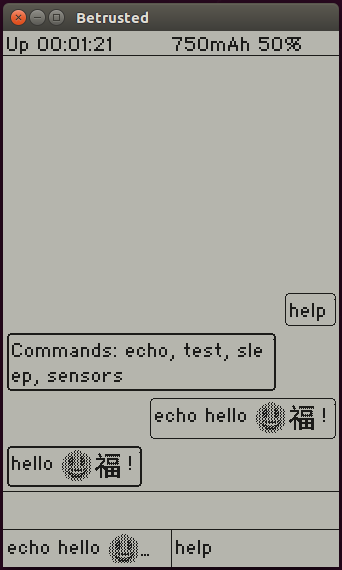
shellchat is a baseline demo application for Xous. It uses a chat-client
style interface (stacking bubbles of text, with user input right-aligned
and shell feedback left-aligned) to facilitate interactions with the hardware.
It implements the basic envisioned structure of a Xous application, namely:
- Text input comes via the
ime-frontend - Graphical output is rendered via the
gam
Other facilities for handling system-level messages, such as menu configurations and network events, have yet to be implemented. However, they will likely end up with a demo in this application first.
To make your own command, copy the ver.rs template (for an example with argument parsing),
or snag the very simple echo template below, and put
it in the services/shellchat/src/cmds/ directory:
use crate::{ShellCmdApi, CommonEnv};
use xous_ipc::String;

#[derive(Debug)]
pub struct Echo {
}

impl<'a> ShellCmdApi<'a> for Echo {
    cmd_api!(echo); // inserts boilerplate for command API

    fn process(&mut self, args: String::<1024>, _env: &mut CommonEnv) -> Result<Option<String::<1024>>, xous::Error> {
        Ok(Some(rest))
    }
}
The "verb" is the name of your command, and it is the argument to the cmd_api!() macro.
process() is your "main" function, and args is a string which contains the
rest of the line that was typed into the chat, minus the verb used to identify
your command (the arguments, as they may be, but not tokenized or parsed in
any way). env contains some items in a common environment, for example, connections
to the GAM, LLIO server or other resources required by your implementation.
Once you've added your command to the directory, go to the cmds.rs file, and follow
the four-step instructions embedded within the file, starting around line 40.
Things to Keep in Mind
- Xous is currently
nostd - When you're done adding your command, you should be able to do a
cargo xtask runand it will fire up an emulated environment, like the one above - Type...very...slowly...when using the emulated environment.